YouTube Video Summarizer: Create Effective Content Fast
Extract the key points, timestamps, and main takeaways from any YouTube video in seconds using AI — free and without creating an account. Paste the video URL and get a structured summary that covers everything said in a 60-minute video in about 30 seconds of reading. No browser extension required.
Paste a YouTube video URL to summarize it
Summary Result
Got the result? Now turn that video into viral Shorts
ToolXP Clips auto-clips the best moments with AI captions
How to use YouTube Video Summarizer
Three simple steps to get professional-grade results. Our AI handles the heavy lifting so you can focus on what matters.
Paste the YouTube video URL
Copy any YouTube video URL — lectures, podcasts, tutorials, interviews, and documentaries all work. Paste it into the field above and click Summarize.
AI reads the transcript and extracts key points
The AI reads the video's caption track and identifies the core themes, arguments, steps, and conclusions — grouping related content into digestible summary sections.
Read or copy the summary
The generated summary appears with section headers and timestamped references. Copy the full text, export as a PDF, or paste it into your notes app, Google Docs, or Notion workspace.
YouTube Video Summarizer Features
The more detail you add, the more control you'll have over the final output. Use a mix of the elements below to create results that better reflect your imagination.
How others are using YouTube Video Summarizer — real results from real creators.
Summarising a 3-Hour Conference Talk
Paste the URL of a long conference keynote or industry panel discussion and get a structured summary covering the main arguments, data points, and conclusions — readable in 3 minutes instead of watching 3 hours.
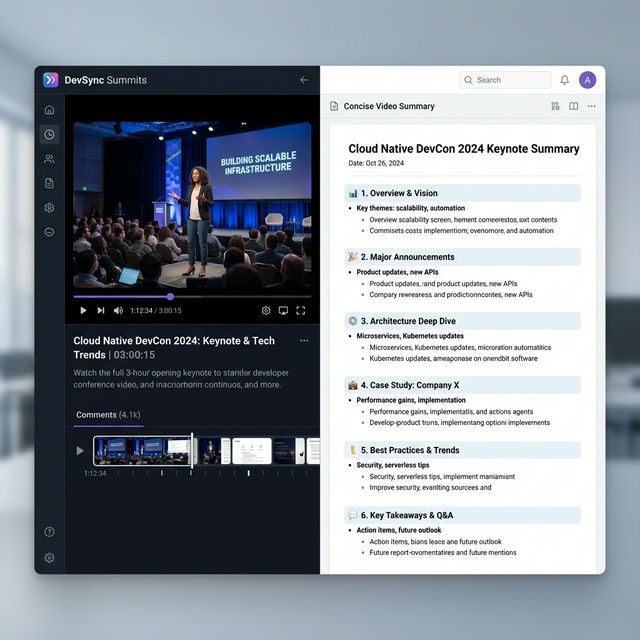
Result: 3-hour developer conference talk → 6-section structured summary with timestamps, readable in 4 minutes

Result: 25-minute Photoshop tutorial → numbered step-by-step reference list exportable to Notion
Extracting Steps from a Tutorial Video
Summarise coding tutorials, cooking guides, or DIY walkthroughs to extract the numbered steps as a bulleted reference list — faster than rewatching when you need to recall a specific step.
Turn any long video into viral Shorts
ToolXP Clips uses AI to find the best moments, add captions, and export vertical clips. Free to start.
Tips for better YouTube Video Summarizer results
Get the most out of YouTube Video Summarizer with these practical tips from our team and power users.
Who uses YouTube Video Summarizer
From solo creators to marketing teams, YouTube Video Summarizer fits into every content workflow.
How YouTube Video Summarizer compares
See why creators choose ToolXP over other options. We offer faster processing, better output quality, and zero cost — no strings attached.
Try it free| Feature | ToolXP | Eightify (Chrome Extension) | NoteGPT |
|---|---|---|---|
| Price | Free | Free (limited); Pro from $6.99/mo | Free (5 videos/day); Pro from $9.99/mo |
| Signup required | |||
| AI-powered | |||
| Export quality | HD / 4K | GPT-powered summaries | Transcript + AI summary |
| Batch processing | |||
| Commercial use |
Want the full suite? Try ToolXP Clips
AI auto-clipping • Animated captions • 2K export • No watermark (Pro) • Starting free
Loved by creators
Creators share how YouTube Video Summarizer fits into their workflow.
Frequently asked questions
Everything you need to know about YouTube Video Summarizer. If you have additional questions, reach out to our support team.
Contact supportMore tools
Explore our other free utilities designed for content creators.
Start using YouTube Video Summarizer
Discover what's possible when AI meets your creativity.
Use YouTube Video Summarizer
Extract the key points, timestamps, and main takeaways from any YouTube video in seconds using AI — … No signup required.
GoCreate viral Shorts with Clips
AI-powered long-to-shorts clipper. Auto-find best moments, add captions, export in vertical. Free to start.
Start clipping